

Bottom line: Learn how to create percentage change formulas in Excel with negative numbers.
Skill level: Intermediate
In my last post I shared a macro to quickly create percentage change formulas. I also explained two formulas we can use to calculate percentage change.
Formula #1
=(new value – old value) / old value
Formula #2
=(new value / old value) – 1
Both of these formulas will produce the same result when the numbers are positive. The one you use is just a matter of personal preference.
The goal of the percentage change formula is to allow us to make comparisons on performance between two or more items. This could be time periods, entities, categories, businesses, etc. This formula can also be used to calculate discount percentages.
Download the File
Download the file to follow along.
What if the numbers are Negative?
After a bit of research, I have not found a good way to calculate the percentage change when either the old number or the new number are negative. There are definitely formulas you can use, but they seem to produce incorrect or misleading results.
The Wall Street Journal has an old guide to earnings reports that says this:
Net Income percent change is the change from the same period from a year ago. Percent change is not provided if either the latest period or the year-ago period contains a net loss [negative number]. On the digest page, if a company posts a profit in the latest period against a loss in the year-ago period, the percent change is represented as a “P”. Similarly, if a company posts a loss in the latest period against a profit in the year-ago period, the percent change is represented as a “L”.
This article might be outdated, as I have found that recent WSJ financial pages are using the ABS method (more on that below) to calculate percentage change, but the point is that percentage change on negative numbers can produce misleading results.
What about the ABS (Absolute) Method?
One common way to calculate percentage change with negative numbers it to make the denominator in the formula positive. The ABS function is used in Excel to change the sign of the number to positive, or its absolute value.
Here is the formula that is commonly used:
=(new value – old value) / ABS(old value)
Technically this formula works to produce a percentage change number with the correct sign (positive/negative). However, I believe it produces misleading results.
The image below contains an example of this. The Old value is negative and the New value is positive.
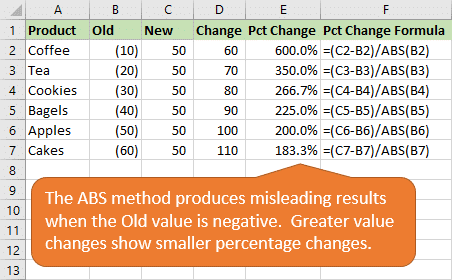
- When the value goes from -10 to 50, the amount change is +60 and percentage change is 600%.
- When the value goes from -60 to 50, the amount change is +110 and percentage change is 183.3%
Although the calculation is technically correct because we changed the denominator (old value) to a positive number, the results don't really make sense to me.
If you were just looking at the percentage change numbers, you would think that Coffee did better than Cakes. When in reality Cakes made a huge gain in profit over the prior period, much larger than Coffee.
The same issue happens when the numerator (new value) is negative. Here is another example that produces misleading results.
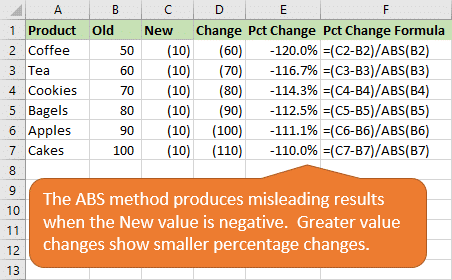
In this example Cakes had a larger negative value change, but smaller percentage change than Coffee.
But I've Always used the ABS Method!!!
I know, me too. I've seen this method used throughout my career, and it looks like the Wall Street Journal is even using it. I spotted it in some of their growth metrics on this page of Bank of America financials.
It's hard to say that it's completely wrong to use the ABS formula. But, it's good to know that the results might be misleading. So use it with caution! 😉
Alternate Calculations for Percentage Change with Negative Numbers
Here are a few ways to test for the presence of a negative number, and provide an alternate result.
Method #1: No Result for Negatives
The first thing we can do is check if either number is negative, and then display some text to tell the reader a percentage change calculation could not be made.
The following formula does this with an IF function and MIN function.
=IF(MIN(old value, new value)<=0,"--",(new value/old value)-1)
Here's how the formula works:
- The logical test of the IF function (MIN(old value, new value)<=0) finds the minimum of the two values and tests if the value is less than or equal to zero. The result will either be TRUE or FALSE.
- If the result is TRUE, then a negative number (or zero) exists. In this case we can display some text to tell the reader. This can be anything you want. I just used two dashes “–“. You could also have it return an N/A error with the NA() function, or any other text that lets the reader know the percentage change could not be calculated.
- If the result is FALSE, then the percentage change formula is used to return the percentage change on the two positive numbers.
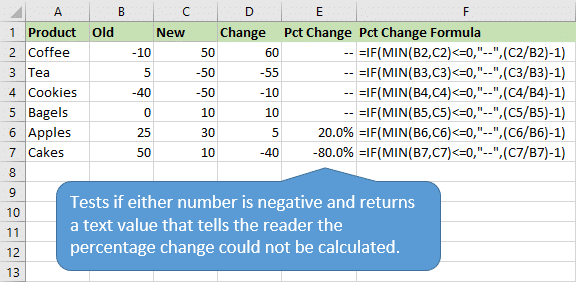
This formula also handles the divide by zero (#DIV/0!), so we don't have to wrap it in the IFERROR function.
Method #2: Show Positive or Negative Change
The Wall Street Journal guide says that its earning reports display a “P” or “L” if there is a negative number and the company posted a profit or loss.
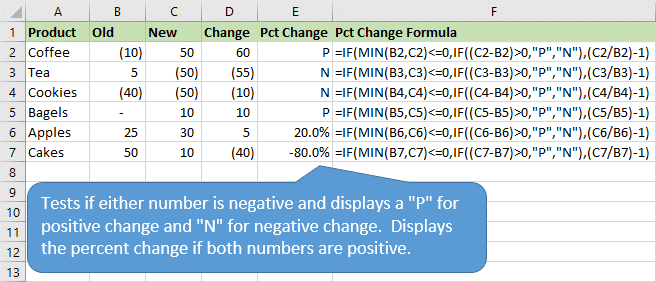
We could use this same methodology to tell our readers if the change was positive (P) or negative (N) when either value is negative.
The following formula tests for this with an additional IF function.
=IF(MIN(old value, new value)<=0,IF((new value - old value)>0,"P","N"),(new value/old value)-1)
Here's how the formula works:
- We start with the same logical test to determine if a negative value exists using the MIN function.
- A second IF function is then used to determine if the change from old to new is positive or negative.
IF((new value – old value)>0,”P”,”N”)
This IF statement returns a “P” for a positive change and an “N” for a negative change. - If both numbers are positive then the percentage change formula is used to display the result.
Other Methods for Percentage Change with Negatives?
Calculating the percentage change when negative numbers are involved is not easy. The ABS method is probably the most commonly used, but it can produce misleading results.
The ultimate goal should be to keep things positive, so we don't have to worry about the negative… 😉
Do you have any other methods for this calculation? Can we further simplify either of the methods above? I'm interested to hear your thoughts. Please leave a comment below with questions or suggestions. Thanks!




I haven’t worked out the formula yet but it seems to me in the “Cakes” example above the value of the change is 110, so the percent change between -60 and 50 would be the equivalent % change between 0 and 110. In this case the ABS value of the negative number could be added to both sides (so we’d have 160+60 = 0, 50+60=110), so the calc would be done between 0 and 110. Am I on the right track?
Hi Jomili,
I understand where you are going with that. The issue I see is that we can’t really calculate the percentage change between 0 and 110. You would then get the divide by zero error.
If you were to change the 0 to 1, then you would get a percentage change of 10,900%. This produces misleading results as well.
Thanks for leaving a comment though. It’s tough to find a solution for this calculation.
I think I’m almost there. I got over the divide by zero by adding 2 to the numerator and using 2 for the denominator. I started with our base formula and then came up with the three alternatives:
=IF(MIN(A1, B1)>0,(B1/A1)-1,”–“) Base formula
=IF(A1<=0,(B1+ABS(A1)+2/2)-1,"–") If A1 is negative
=IF(B10,(B1/A1)-1,IF(A1<=0,(B1+ABS(A1)+2/2)-1,IF(B1<=0,(ABS(B1)+A1+2/2)-1,ABS(ABS(B1)/ABS(A1)-1))))
It works, except I need to rearrange it so the check for Both is at the front instead of the back of the formula. Please fool with it and see if it's the way to go. I think it is.
I think some of my formulas got messed up. Let’s try again:
If A1 is negative:
‘=IF(A1<'=0,(B1+ABS(A1)+2/2)-1,"–")
IF B1 is negative:
'=IF(B1<'=0,(ABS(B1)+A1+2/2)-1,"–")
If both are negative:
'=ABS(ABS(B1)/ABS(A1)-1)
I think if we can put all three conditions together with the base formula we'll be there.
I think this is it. Old value is in A2, New Value is in B2:
=IF(MIN(A2, B2)>0,(B2/A2)-1,
IF(AND(A2<=0,B2<=0),ABS(ABS(B2)/ABS(A2)-1),
IF(A2<=0,(B2+ABS(A2)+2/2)-1,
-(ABS(B2)+A2+2/2)-1)))
Thanks for the formula! This worked perfect! Unless anyone knows of a more efficient update to this?
This works. I created this a couple of years ago. My problem now is I’m trying to get % difference from working in this way inside a pivot table. Let’s hope a calculated field with this formula works 🙂
IF(AND(J2=0,K2>0),1,IF(AND(J2=0,K2<0),-1,IFERROR(((K2-J2)/J2)*SIGN(J2),"")))
I am facing similar problem in my work. I have to calculate percent change between last year and this year numbers for which your solution is good but goes tangent. I want a single formula that sees everything and calculates correctly. I created a formula of my own but is lengthy :
=IF(AND(B4>0,C4>0),C4/B4-1,IF(AND(B4>0,C4<0),-(-C4/B4+1),IF(AND(B40),-(C4/B4-1),-(C4/B4-1))))
B4 and C4 are cells containing last yr and this yr numbers – there can be 4 possibilities so i listed all of them in the formula which has made it lengthy. It maybe very helpful if you can simplify this formula
Thanks & Rgds
Anmol
Hi Armol,
I believe the last AND function is missing some text. AND(B40) doesn’t look right. Should it be B4<0? Do you have another condition there for the AND function?
Jon
Hi Jon,
You were right. It seems i had wrongly copied and pasted. So doing it again – the formula is below:
=IF(AND(B4>0,C4>0),C4/B4-1,IF(AND(B4>0,C4<0),-(-C4/B4+1),IF(AND(B40),-(C4/B4-1),-(C4/B4-1))))
This formula can be dragged down or right and is working for me. But, takes lot of space and slows speed. So a more efficient formula is required
Anmol
hi Jon/Anmol,
Anmol’s fornula is the right one, I guess, am I right?
just editing it as he wrongly copy/paste it
=IF(AND(B1>0,C1>0),C1/B1-1,IF(AND(B1>0,C1<0),-(-C1/B1+1),IF(B1,-(C1/B1-1),-(C1/B1-1))))
This is the correct way to do it. Thanks!
This is working for me if A is positive and B is negative but not the other way around. Also not calculating if one of the nubmers is 0. Can you help? Thank you.
Doesn’t work if current period is 0. Shows as 100% instead of -100%.
This works. I created this a couple of years ago. My problem now is I’m trying to get % difference from working in this way inside a pivot table. Let’s hope a calculated field with this formula works
IF(AND(J2=0,K2>0),1,IF(AND(J2=0,K2<0),-1,IFERROR(((K2-J2)/J2)*SIGN(J2),"")))
Sorry to be late on this but I came across this whilst searching on another negative problem.
Two variations:
Where one of the numbers is 0.
IF(AND(J2=0,K2>0),”+∞”,IF(AND(J2=0,K20),1,IF(AND(J2=0,K2<0),-1,IFERROR(((K2-J2)/J2)*SIGN(J2),IF(AND(J2=0,K2=0),0,""))))
Now to get back to solving the problem of negative interest rates in the EFFECT and NOMINAL functions.
Hey Jon –
I’ve usually used the following:
Assume A1 is the new value & B1 is the old value. =(A1-B1)/B1*SIGN(B1)
I wonder if I’m missing something by using this method. Can you spot any limitation?
Best,
Mark
Hi Mark,
I believe that would be the same result as the ABS method. The SIGN function is just going to return a negative 1 if the sign of the denominator (B1) is negative. A negative multiplied by a negative is a positive. So this is the same result as using ABS to return the absolute value of the denominator.
Therefore, the limitations would be the same as a I explained with the ABS method. It’s amazing how many different ways there are to accomplish the same task in Excel. I guess that is what makes it fun. 🙂
Thanks for posting this Mark!
Using your example where
Product Old New Change
Cell B2 C2 D2
Coffee -10 50 60
this formula applied to all rows returns results that seem to provide percentages that represent the correct directional change.
=IFERROR(IF(MIN(B2,C2)<=0,D2/ABS(B2)+C2/ABS(D2),(C2/B2)-1),0)
Thanks for the suggestion John! I see an issue when the numberator (new number) is negative. I tried it on the Negative Numerator tab in the example file and still see misleading results.
I believe I have created the ultimate % change formula which works with -ves and 0s:
Where Y17957 is the old value and Z17957 is the new value.
=IFERROR(IF(AND(Y17597=0,Z17597>0),1,IF(AND(Y17597=0,Z17597=0),0,(Z17597/Y17597-1)*SIGN(Y17597))),-1)
Good luck!
Hey, looks like this one works! Need to test a bit more but looks like this is it. Well done! Thank you!
Tested this formula with the series used in the example for ABS formula above and both SIGN and ABS gave exactly the same results.
Looks like we need to continue with the search for the right one! 🙂
Nope. Val1 -1.34 and Val2 .59 = 143%
but
Val1 -8.49 and Val2 .59 = 107%
Can’t be.
What is wrong with this formula:
=(A1-B1)/ABS(B1)
where a1 is the current value and b1 is the prior value.
It works for all six possible scenarios:
both numbers are positive and the current value is greater than prior value
both numbers are positive and the current value is less than the prior value
both numbers are negative and the current value is greater than prior value
both numbers are negative and the current value is less than the prior value
current value is positive and the prior value is negative
current value is negative and the prior value is positive
To wit:
current vs prior
10 vs 5 = 100.0%
5 vs 10 = -50.0%
10 vs -5 = 300.0%
-10 vs 5 = -300.0%
-5 vs -10 = 50.0%
-10 vs -5 = -100.0%
Hi Ed,
The negative to positive or positive to negative scenarios are where the formula produces misleading results.
Going from -5 to 10 = 300%, this is a change of 15.
Going from -1 to 10 = 1100%, this is a change of 11.
If you were to look at the percentages without the numbers, an 1100% increase would look better than a 300% increase. However, the 300% increase was actually a bigger change in terms of whole numbers. I’m sure we could argue that the math is correct, but if we are only looking at percentages then we might miss something significant.
I hope that helps.
This feels far more relevant after the negative oil prices recently! However, I wonder if it is very odd for a seller.
If you were a speculator, and you were currently making a loss of $100K due to negative prices (assuming oil bought at $0), the greater % change would make some sense.
In the first case, you would go from $100K losses to (only) $200K profits. In the second case, you would go from $100K losses to $1M profits.
(Hope that maths was right.) Any thoughts?
Ignore my last comment. Upon re-reading it, I see you are mentioning this formula in your article.
Sorry Ed, I just read this after responding. 🙂
Hi,
How do you explain the change of the following example:
(-60)/60 = -100%
(-60-10)/(60+40) = (-70)/100 = -70%
As the numerator decreases, and denominator increases, why is the percentage change increases?
If it’s still relevant.. The percentage is not relative to the value/weight of the change but only to itself. And this is the same with positive number.
ex: 1 to 3 will result in 200% change; 10 to 17 will result in 70% change. Although 17-10 > 3-1. Same thing goes with -5 to 10 (300%) VS -1 to 10 (1100%). Therefore your pct number is not always representative of weight/chg value.
To solve this, I believe you’d have to enter a new parameter. If the SUM of the OLD qty is positive like in your example, you could use this and the change column to compare weight towards total growth.
ex: Sum up the OLD # of items in your last table, which gives +30. Divide the change column by this number to have the % of weight toward growth. In this example your -5 to 10 would be greater than -1 to 10.
Another way would be to Nest IF() functions and setup the different formulas for negatives, positives, zeroes, etc.
Percentage formula for the negative to positive or positive to negative scenarios:
Old value is F1 and the New value is F2:
=IF(AND(F2>=0,F1<=0),(F2-F1)/ABS(F1),IF(AND(F2=0),(F2-F1)/ABS(F1),IF(AND(F2<F1,F2<=0,F1F1,F2<=0,F1<=0),LN(ABS(F1)/ABS(F2)),LN(F2/F1)))))
This has caused me issues in the past so thought i’d have a go at trying to solve!
I have sampled my results below
Col B Col C Col D Col E
Status Old New Percentage + / –
Row 9 ▼ 10 -5 -150%
Row 10 ▼ 4 -2 -150%
Row 11 ▼ 1 0 -100%
Row 12 ▼ 10 0 -100%
Row 13 ▲ -1 1 200%
Row 14 ▲ 0 1 100%
Row 15 ▼ 2 1 -50%
Row 16 ▼ 10 1 -90%
Row 17 ▲ -2 2 200%
Row 18 ▲ 0 2 200%
Row 19 ▲ 1 2 100%
Row 20 ◄► 2 2 0%
Row 21 ▼ 3 2 -33%
Row 22 ▼ 4 2 -50%
Row 23 ▼ 10 2 -80%
Row 24 ▲ -3 3 200%
Row 25 ▲ 1 3 200%
Row 26 ▲ 2 3 50%
Row 27 ▲ -4 4 200%
Row 28 ▲ 2 4 100%
Row 29 ▲ -5 10 300%
Row 30 ▲ 0 10 1000%
Row 31 ▲ 1 10 900%
Row 32 ◄► 10 10 0%
Row 33 ▼ 20 10 -50%
Row 34 ▼ 50 10 -80%
Row 35 ▲ 5 20 300%
Row 36 ▲ 5 20 300%
Row 37 ▲ 10 20 100%
Row 38 ▲ 10 50 400%
Formula used in COLUMN E
=IF(C9=0,(D9*100)/100,IF(C9>0,(D9/C9)-1,IF(C9<0,IF(C9<0,IF(C9<0,IF(C9<>C9,ABS(D9-C9),ABS(C9-D9)))/((IF(D9>C9,ABS(D9-C9),ABS(C9-D9)))-D9),),)))))
Please let me know if you think i have cracked it!
Hi Hazel,
Thanks for sharing your solution! I haven’t had a chance to fully evaluate the formula yet, but based on your list of results it looks like it works.
When I look at the formula it seems like it could be simplified a bit, but maybe I need to study the logic further. Maybe you can explain it further.
Thanks again! 🙂
Hi Hazel,
I think this formula works, however it is way too complicated. Try this one:
=IFERROR((O10-N10)/ABS(N10),(O10*100)/100)
I tested it against yours with positive numbers, negative numbers, and zeros in both columns and it produces the same result in each instance.
Cheers.
Let’s not lose hope. This is still wrong.
try this inputs.
from -9 to 4.5 has +150% growth
from 1.8 to 4.5 has +150% growth
both will yield +150%.
notice that both are coming from different value. However, with same growth, it is misleading…
vince how to get the output of 150% growth in excel in case of: from -9 to 4.5 growth
Hi Jon, can you tell me if I am calculating his right? It seem like Growth rate should be positive. I tried your formula and still came out with a negative.
FY17 FY16 +/- %
New accounts 77 56 21 38%
% of new accounts 56% 45% 11% 24%
Growth rate (YOY) 27% -13% 14% -308%
Hi Rhonda,
As I mention in the article, going from negative to positive tends to lead to misleading results. There are a few alternate solutions posted in the comments here, but the formulas get a bit complex. Thanks!
been handling y-o-y percentages and stumbled upon the same problem…I hope it makes sense to you and only works if the starting value is negative and the end value is positive…I think reversing the initial and end values then multiplying the result by -1 would show a more logical result… say your initial value is -23 and it grew to 79 over a stated period of time… by switching their position the formula would show (-23-79)/79 which would result to a -129% which you would then multiply by -1 so 129%.
I sent a response previously, The math was wrong. that was an impulse answer…after further testing… the formula I came up with is to add absolute of the old number to the new number, this will reset figures to zero…so the old number is now zero… then add 1 to both numbers (this would mean that each time the old number will be 1 so as to establish a base for comparison) then do the normal formula…then divide by ten. sample… -1 and 10 (which has a change of 11) > becomes 1 and 12 (10 + abs of -1 +1) which results to 1,100%/10 = 110%
sample 2 … is -6 and 5… again a change of 11 so it becomes 1(when adding absolute of old number to the new number it is reset to zero and we add 1 to both sides) and 12 (abs of -6 plus 5 plus 1) which also yields 1100% divide by 10 = 110% which shows the same level of change as with the 1st example… send me a response you need clarification I hope this helps
sorry, forgot one thing… the divisor is not always 10… it will depend on the place value of the new number after adding the absolute of the old number so if the sum of the new number and absolute yields 3,005 the divisor will be 1000…
Going from a negative to a positive does make sense. It doesn’t give misleading results at all, in fact it gives the exact results you’d expect. Your first excel sheet example when you compare coffee and cakes you say it doesn’t make sense? Well yeah it makes sense, why would anyone think cakes did better than coffee? Coffee obviously did way better than cakes. the profit increase DOES NOT matter here. When seeing who did better you look at by what FACTOR did it increase. Coffee goes from -10 to 50, so it increases by a factor of 6, which is very impressive (hence the 600%). Cakes did not do that good, they went from -60 to 50. They did not even increase by a factor of 2 but in fact was just shy of that. (hence the 183%). The amount change DOES NOT MATTER, only the factor by how much the starting amount increases. This is the same as stocks.
How is a change from -10 to 50 a much more impressive than a change from -60 to 50? You said that “only the factor by how much the starting amount increases” matters. -60 is a much smaller number than -10, which means that the factor by how much the starting amount increases is much greater with the cakes than with the coffee. You are treating the negative and positive numbers as if they were the same, but they’re not.
When do you go from a negative stock price to a positive stock price or vice versa to calculate percentage change?
I am not sure you are using common sense here or maybe this is one of those counter intuitive things like the Monty Hall problem.
This is one of those “Counter-intuitive” things that I’ve thought a lot about. J is correct. Imagine if I have a set consisting of {-2, -3, -1}. And imagine if those numbers changed to {7,9,6}. That would be a large increase, because we are going from numbers that are close to 0 (i.e. -2, -3, -1) to numbers far from 0 (i.e. 7, 9, 6). The magnitude of those numbers changed greatly. Now, imagine the situation where we go from {-10, -11, -13} and those change to {7,9,6}. While I did see a larger change in range, I did not see a larger change in magnitude. I had numbers far from 0 go to numbers far from 0. So, the RPD should be greater for numbers that are “small” (closer to 0) than numbers that are “large” (far from 0). If that wasn’t the case, then we would simply be able to shift all negatives to a positive (by adding a certain amount) and then add that amount to the positives to get even greater positives. That would be wrong, as we could always force the negatives to go to “0”, thus destroying all meaning to our formula.
I completely get why it is confusing, as it took me a second to rationalize what was going on. As to whether the formula is correct for your situation, I do not know. You might be looking for a “weighted range”, where you take the interval and divide by the average of the two starting numbers. Regardless, the formula is correct and leads to realistic values.
Just solve it graphically.
i think this works
if(b2<0,1-d2/b2,d2/b2-1)
I think it almost works, if you are not trying to find % increase – just %, but I think it should be:
if(b2<0,1-d2/b2,-(1-d2/b2))
The results look reasonable, but it is hard to test the negatives. In my old days, I would try to do a mathematical proof to test, but I'm afraid it is over my head now!!
For % change, what about this crazy nested if statement?
=IF(OLD*NEW<0,IF(OLD<0,1-(NEW-OLD)/OLD,-(1-(NEW-OLD))/OLD),IF(OLD+NEW<0,1-(NEW-OLD)/OLD,-(1-(NEW-OLD))/OLD))
The results look reasonable and they are positive and negative when they should be, but I'm assuming if industry just doesn't bother doing it, there isn't a simple solution???
Simplest way to solve this uses Boolean logic and the original yoy formula(s):
if( OLD < 0 , -1 , 1) * ( (NEW – OLD)/OLD ) = YOY%
if( OLD < 0 , -1 , 1) * ( (NEW / OLD) -1 ) = YOY%
The second formula was a huge help! I removed the spaces here for anyone who wants to copy it straight into Excel:
if(OLD<0,-1,1)*((NEW/OLD)-1)
Brilliant and easy solution, thanks
This is the best solution I have found. Thank you!
this returns exactly the same values as the original abs formula: (NEW-OLD)/ABS(OLD) but it is larger, so why not to stick to the origins?
What is the old value is zero and the new is 60? Excel gives an error, other sites claim the % increase is “infinity”. How do I explain that?
Hi all
How about =IFERROR((C2-B2)/ABS(B2),IF(C2=0,”-“,IF(C2>0,1,-1))) , where C2 is NEW VALUE and B2 is OLD VALUE ?
THANK YOU!
Wow, thanks so much! The formula is short but works very well in any positive/negative situation.
Hi
I had a situation, where the turnover was negative but the cost price was in the positive.
What I had to do, was try and use the GPS. But it got complicated when I did a recon with several positive GP’s and a negative GP.
Nobody can seem to help me with this.
Hope you have some suggestions
Hi Jon,
The formula provided in this page really helped me. But I have one question regarding formula with ABS.
I think this formula doesn’t give misleading result. In above example, though the change between old and new values has increased, the old value has also increased compared to old value of previous row. So, the percent change has not increased as per increase in value.
Am I making sense?
Apologies if my solution has already been posted, I’m undeniably lazy by not checking everyone’s comments.
The way I’ve got around the problem is (bearing in mind I want the %, not the % change – you can find the % change by simply -1 at the end):
=if(budget>=0, revenue/budget , if (revenue<0, budget/revenue), abs (revenue/budget)))
For lazy people: where the numbers are positive it does a standard %, where both numbers are negative it reverses the formula, and where the budget is negative but the result positive it uses the abs.
It does open me up to DIV/0 errors, so I've wrapped it in an iferror on my actual sheet, although from a practical perspective this is unlikely given the nature of my sheet.
And in the event that the result is negative but the budget positive, I get the correct output if not the mathematically correct answer – so I'm not losing sleep over that aspect.
Hope this helps
Jomili,
There are actually 6 conditions not just 3.
Old New Net Outcome
+ + + +
+ + – –
+ – – –
– + + +
– – + +
– – – –
Where R is Old, S is New, T is Net
=IF(AND(R7>0,S7>0,T7>0),S7/R7,IF(AND(R7>0,S7>0,T70,S7<0),-(-S7/R7+1),IF(AND(R7<0,S7<0,T7<0),-(S7/R7),IF(AND(R7<0,S70),(S7/R7),IF(AND(R70),(-S7/R7+1)))))))
its not an excel problem. its a statistics one. please try to understand the gap from old to new and for higher gap result should be higher %age and vice versa.
Here is the formula I came up with. Hope it helps someone. Everyone’s input here helped me.
IF(ABS((new-old)/(old))*IF(new<old,-1,1))
So what is happening is first we determine the percent change and then create an absolute number. Next we multiply that by a -1 or +1 depending on whether the new number is less than the old or not.
Your formula does not work. Its invalid for an If function.
I don’t see how that’s a misleading result because the percentage changes are generated for different base values. we are not supposed to compare like that.
While in math, a negative percentage change might not be worth considering, in finance it is. Consider this: Year 1 (Y1) I spend $100 more than I make (-$100), but Year 2 (Y2) I make $200 more than I spend. That’s a difference of $300 (or 300% change). It’s important to be able to meaningfully track these growth/change rates, even if the change involves negative numbers.
After trying some of the formulas above, I believe I found a simple solution that as far as I can tell always works, even when calculating change in percentages. There are 8 conditions to consider, but only two outcomes: a positive ratio or a negative ratio. Half of the conditions result in a simple Y2/Y1 formula, the other half in a -(Y2/Y1) formula.
If you have 3 columns (the 3rd one can be hidden in your spreadsheet), the first is Y1, the 2nd Y2, and the 3rd is the change between Y1 and Y2 (we’ll call these columns A1, A2, and A3 respectively). Consider then the following conditions (in $)
Y1 Y2 Change/Delta
SET A:
10 20 10
20 10 -10
10 -20 -30
20 -10 -30
SET B:
-10 -20 -10
-20 -10 10
-10 20 30
-20 10 30
In SET A, to calculate the percentage change you use the formula Y2/Y1
In SET B, to calculate the percentage change you use the formula -(Y2/Y1)
However, in both sets, conditions 3 and 4 are identical, so there are only 3 conditions (not 4) for each set.
Thus, the excel formula to calculate percentage change in each row (column A4) would look like this:
=IF(OR(AND(A1>0,A2>0,A3>0),AND(A1>0,A2>0,A30,A2<0,A3<0)),A3/A1,-(A3/A1))
You can substitute the A3 part with (A2-A1), but I find it's useful to be able to actually see the difference as part of the error correction process, and breaking it out simplifies the final formula.
Hi,
How to calculate CAGR , when the beginning number is negative ?
Regards,
Viswanathan
How can I calculate the original value with only the percentage change and the final value.
PRICE QUOTED PERCENT HIGH/LOW What is original price?
$4.746 195% = X original price
$4.014 67% = X
$2.269 379% = X
$1.710 -58% = X
$0.643 2098% = X
$2.623 -96% = X
NEGATIVE = LOWER PRICE – WE ARE LOWER THAN ORIGINAL PRICE
POSITIVE = HIGHER PRICE – WE ARE HIGHER THAN ORIGINAL PRICE
Hello guys,
I read your comments but still can’t figure out how to solve my issue. I am calculating delta% out of 2 negative profits.
Current year: -167 086
Previous year: -798 204
The standard formula = (CY/PY)-1 give me -79.1%
I can’t understand why this happens, as it’s clear that there is an increase of 631118. Why the % is negative. I see like 300% increase.
Hi,
Over and beyonf this how about when you are dealing with Cumulative Annual Growth Rates (CAGR) for a period of more than 2 years as well as both positive and negative numbers. Does anyone know how to deal with this? Excel ends up with the same #NUM error caused by finding the nth root of a negative number.
Any takers?
i think just @abs(new/old-1) would work regardless of the sign
The @abs(new/old-1) works well, in some situations yes. E.g. when you have the below:
New Old Difference
50 -50 200%
But as soon as your difference is going from a loss to profit, you´ll get misleading values as ABS formula doesn´t consider the negative value at all:
New Old Difference
-50 50 200%
Same thing if you have zero as new value and either a positive/negative number as old value, ABS doesn´t reflect the change correctly, but gives you a 100% positive difference in both cases:
New Old Difference
0 50 100%
0 -50 100%
Do we have a final verdict?
Hello all…
This is one of those things that just drove me crazy because conceptually, this is very simple to understand, but it’s just a mess working it out logically while still taking into consideration what the various results actually mean. I read a lot of your responses here and incorporated a number of your considerations in my solution, including:
– What to do when the prior period is zero and current period is not zero
– What to do when the prior period is not zero but the current period is zero
– How to acknowledge when a current or prior period has had NO activity compared to the other, in which case there is no actual % gain or loss, but the dollars are positive or negative
– How to deal with #DIV/0! and #N/A issues while still communicating what happened with the dollars (I chose pretty bland descriptions for the weird results, as you’ll see. Replace the text with whatever you think is good).
Not included in this formula, but still worth noting – I use conditional formatting color scales to visually show the percentage ranges among the broader data, like on cash flows or P&L’s. I think it helps managers put the results in perspective.
Here you go, this has been working for me for awhile, and it’s a mess, but just throw it in Excel and test it out.
=IF(ISERROR(IF(AND(ISBLANK(B68),ISNUMBER(C68)),”Prior Period Inactive”,IF(AND(ISNUMBER(B68),ISBLANK(C68)),”Current Period Inactive”,IF(AND(ISBLANK(B68),C680),”Positive”,IF(ISBLANK(C68),””,IF(ISBLANK(B68),””,(IF(ISBLANK(OR(B68,C68)),””,(IF(B68<0,-1,1)*((C68/B68)-1))))))))))),"Prior Period was $0",IF(AND(ISBLANK(B68),ISNUMBER(C68)),"Prior Period Inactive",IF(AND(ISNUMBER(B68),ISBLANK(C68)),"Current Period Inactive",IF(AND(ISBLANK(B68),C680),”Positive”,IF(ISBLANK(C68),””,IF(ISBLANK(B68),””,(IF(ISBLANK(OR(B68,C68)),””,(IF(B68<0,-1,1)*((C68/B68)-1)))))))))))
Hope this works for you all!
You can just add x to the NEW and the OLD. If x is big enough to shift them both to positive.
I thought of that as well but it sees like it give the aame proble as with negatives. I mean aas the example above:
% Change
Original -10 50
Adding 10 10
New Summ 0 60 #DIV/0!
Adding 20 20
New Summ 10 70 600%
Adding 30 30
New Summ 20 80 300%
Adding 40 40
New Summ 30 90 200%
Adding 50 50
New Summ 40 100 150%
Adding 60 60
New Summ 50 110 120%
Here’s what I came up with today:
=IF(A1=0,”New”,IF(A1<0,-(B1-A1)/A1,(B1-A1)/A1))
where…
A1 = Previous value
B1 = New value and
"New" indicates new activity that wasn't present during the previous period.
This is so wrong in so many levels.
The right and always correct formula is: =(new value – old value) / ABS(old value)
ALWAYS. AND NEVER CREATES MISLEADING RESULTS.
The OP did an error on his calculations when he says it creates misleading results.
Let me explain.
In one part the OP states the following:
“When the value goes from -10 to 50, the amount change is +60 and percentage change is 600%.
But when the value goes from -60 to 50, the amount change is +110 and percentage change is 183.3%”
That’s because in the first case your initial value was -10, so any increase would be in relation with its initial value. That’s why if you divide the amount change +60 by 10 (the initial value). You get =60/10 = 6 = 600%.
But when your initial value is -60, any increase is in relation with your initial value of 60. So you move in fractions of 60 any increase or decrease. That’s why if you divide the amount change +110 by 60 (the initial value). You get =110/60 = 1,833 = 183,33%. If the amount change would have been 120, then the increase would have been 200% but it didn’t made it to 120, it just made it to 110, that’s why is a little less than 200% the increase (183,33%).
The answer is correct, that’s why in reality coffee yes did better than cakes (in percentage increase not absolute value).
Hope it helps and this stop confusing more people.
Hey Arturo,
Thanks for commenting. As I mentioned in the article, I’m NOT saying the absolute method is wrong…
“It’s hard to say that it’s completely wrong to use the ABS formula. But, it’s good to know that the results might be misleading. So use it with caution!”
But I don’t see how your argument changes what I already presented.
If we go from -1 to 50 with the ABS method, the percentage change is 5,100%.
-10 to 50 is 600%.
An amount change of 120 in this scenario means the old value would be -70. In that case the % change with the ABS method would be 171%, not 200%.
The larger the negative number relative to the positive number, the smaller the % change will be with the ABS method.
Another way to think about it is if you were hiking and started 10 feet below sea level, then hiked 50 feet above sea level. The ABS method says that distance is a greater percent change then starting 500 feet below sea level and hiking 50 feet above.
As I mentioned in the article, I understand the math, but the presentation of the numbers can be misleading without explanation or supporting data.
I hope that helps.
Hey Bob,
Sorry for the late respond.
I understand that you are saying that the results are misleading, but they are not, not at all. Te results are correct, what is not correct is actually the way you are seeing percentage changes.
We can say that a percentage change is: the extent to which a variable gains or loses intensity, magnitude, or value. In comparison to its initial value (key point is initial value).
So when you put the example: “If we go from -1 to 50 with the ABS method, the percentage change is 5,100%.”
It changes 5,100% times because the initial value was -1, so for -1 to change to 51 it has to move 51 times its value (1), because from -1 to 0 is one time its value, plus from 0 to 50 another 50 times, and so every time -1 moves one time itself it increases in 100%. That’s why it increases in 5,100%
On the contrary, when you say: “An amount change of 120 in this scenario means the old value would be -70. In that case the % change with the ABS method would be 171%, not 200%.”.
Yes, the amount of change from -70 to 50 is 120, but the percentage change is in relation to what initial value? -1 or -70. In this case -70.
When -70 moves one time itself that’s a 100% change or 70 units, and then another 50 to get to 120, that would be 50/70 = 71% another 71% change. Thats why in total a change from -70 to 50 is and increase of 100% + 71% = 171%.
What I am trying to say is that, is not the same for 1 to move to 2. In that case it increases in 100% because it doubles its values, but if you have 70 and increase it to 71, it increases in as little as 1,4%, because 1 in relation to 70 is just a little value, but 1 in respect to 1 is its total value.
In another example, if you weight 100 lb and you gain weight to 110 lb, you increase your weight in 10% because 10lb is the 10% of 100. But if you weight 20lb and you gain weight to 30 lb, you increase your weight in 50%! because 10lb are the 50% of 20 lb. Its the same 10 lb of weight gain, but the only difference is what is 10 lb of weight change in relation to different initial values 20 lb or 100 lb.
I hope I was clear with my explanation.
Brilliant explanation, thank you!
Arturo is spot on. The author seems to suggest that a move from 100 to 500 (+400) would be preferable to a move from 1 to 10 (+9) simply because the change in absolute values is greater. While he is correct that the change in absolute values is greater in the +400 scenario, this has no bearing on whether a % change calculation is misleading or not, as a % change by its very nature is relative to the initial figure.
With (A2-A1)/ABS(A1), you get an accurate relationship between the direction of the absolute value change and the signage associated with the % change across all scenarios of +/+, +/-, -/- or -/+.
The ABS method should be the preferred method and it is not misleading at all. This is similar to the NPV vs IRR issue (i.e. which to use for ranking purposes when they generate conflicting results).
You aren’t wrong, but I think you might be missing Jon’s point. The results can be both correct _and_ misleading. It’s easy to imagine a scenario where someone looks at the figures Jon presented and draws incorrect conclusions. Eg, looking at the value that has gone from -10 to 50 (absolute percentage change of 600%), and saying “this one has performed way better” than the value that has gone from -60 to 50 (with the absolute percentage change of just 183.3%), when that may not be strictly true that this is a “better” result. If you are working with data that will be presented to or used by other people, you should take into account how they might naively interpret the figures, and try to anticipate and correct for this in advance. Pointing out that this (mathematically, conceptually) valid approach may be misleading is 100% right (see what I did there…)
You completely missed OPs point of view.
> so for -1 to change to 51 it has to move 51 times its value (1)
It’s value is -1 NOT 1.
> When -70 moves one time itself that’s a 100% change or 70 units
Again, why is it that NEGATIVE 70 moves POSITIVE 70 units? Thats what it means to take ABS, which OP is asking.
Basically you failed to provide an example where taking the absolute makes sense. You just repeated examples with positive numbers which OP already demonstrated to be fine. It’s like defining a word in the dictionary by using the word itself.
Another way to see OPs POV is like this:
-1 to 50 vs -10 to 50.
Percent change is 5100% vs 600%.
What if these numbers were positive (with the same differences)?
Say 10 to 61 vs. 10 to 70.
Percent change is 510% vs 600%.
Or 1 to 52 vs 1 to 61?
Percent change is 5100% vs 6000%.
Intuitively the larger the difference the larger the percent change, which was not the case when the numbers involved negatives.
This is an old post but I need to respond to this.
Percent change is relative to the starting number. In your first example you change the starting number – It’s complex when you compare two percent changes with different starting numbers.
You say “-1 to 50 vs -10 to 50.
Percent change is 5100% vs 600%.”
Then you follow by comparing”10 to 61 vs. 10 to 70.” and “1 to 52 vs 1 to 61”
You try to show that “larger the difference the larger the percent change, which was not the case when the numbers involved negatives.” But you are comparing apples to oranges – well in this case you start comparing apples (-1 to 50) to oranges (-10 to 50) and then follow by comparing apples (10 to 61) to apples (10 to 70) and oranges (1 to 52) to oranges (1 to 61).
What you need to do is compare -1 to 50 and -1 to 59 because that is what you did with the positive numbers. In this case percent change is 5100% and 6000% which confirms that the larger the difference the larger the percent change.
To put it clearly you need to use the same starting number and the same differences of 51 and 60 in your example:
You say 1 to 52 vs. 1 to 61
Percent change is 5100% vs 6000%
Then compare -1 to 50 vs. -1 to 59
Percent change is 5100% vs 6000%
OR -10 to 41 vs. -10 to 50
Percentage change is 510% vs 600%
In each example, larger the difference the larger the percent change. Therefore your statement on negative numbers is wrong.
The important thing to remember with percentage change if you want to compare two percentage changes then the starting number needs to be the same.
Arturo does a good job of explaining this but I also want to touch on Jon’s hiking example.
He says “Another way to think about it is if you were hiking and started 10 feet below sea level, then hiked 50 feet above sea level. The ABS method says that distance is a greater percent change then starting 500 feet below sea level and hiking 50 feet above.”
It is a greater percent change. Again to help think about it clearer you need to have the same starting number so lets say we start 500 feet below sea level and hiked to 50 ft above that is a 110% change. But If we started 500 ft below and hiked to 500 ft above that would be a 200% change. When looking at percent change is is the difference in relation to your starting point. In the first example its 550 ft in relation to 500ft. In the second it’s 1000ft in relation to 500ft.
Another way to think about it is: If we started 500ft below you have to hike 1x that to reach sea level (100%) and if you start 50ft below you have to hike 1x that to reach sea level (100%). The amount you hike is different but so is your starting point and that is what we are calculating in relation to.
Thanks for coming to my two years too late Ted Talk – If you happened upon this post like I did via google I hope I helped clear some things up and set Jon straight.
Arturo,
Your explanation makes no sense. Maybe you are right but I would challenge you to give a real life example and actually try to explain it.
When the value goes from -10 to 50, the amount change is +60 and percentage change is 600%.
When the value goes from -60 to 50, the amount change is +110 and percentage change is 183.3%.
So you are saying you would rather go from -10 to 50? Maybe the misleading part is that in general percentage change should not be presented alone (it should include the number change) but nevertheless it is still misleading.
Old value -60……new value -50
This will produce a negative % delta using ABS.
No it wouldn’t. It produces positive 16.7%:
(New Value – Old Value) / ABS(Old Value)
(-50)-(-60) = 10 / ABS(-60) = 10 / 60 = 16.7%
I totally second what you just said. Makes no sense. Percentage is always with a reference (initial number).
What OP is trying to say, probably he should use absolute difference not percentage.
If your thinking is right, how would you explain this?
50 goes to 10 and gives 80% of change
80 goes to 10 and gives 87.5% of change
Thought change is related to its initial value, we can easily see that the second percentage is greater than the first one, which makes sense.
Two more things to point out. First, something interesting, WolframAlpha returns -5100% (decrease) for -1 to 50. It appears they don’t use abs in formula. Second, something to be aware of are the problems of going from 0 to some number or vice versa when calculating percent change.
Thanks Bob! That’s interesting that Wolfram Alpha is not using the ABS method.
The zero start is probably a topic for a whole other post. This post on negatives seems to be heavily debated as is. 🙂
Thanks Jon. Agreed.
I sent WolframAlpha a note to see what their thoughts are on the topic. Who knows if I’ll ever hear back.
Thanks for your post. You are doing good work.
=((B2-A2)/A2)*SIGN(A2)
this worked for me
What does the sign in the formula means?
that leads to the same result he showed above for coffee and cakes :
old new %chg with sign or ABS(denom)
-10 50 600%
-60 50 183%
If im coming from -1 to 100, using the absolute method the answer would be (101/-1) *100% to give 101 %.
An improvement from -500 to 10 using the absolute method will lead to (-500-10)/-500(orignal) to give an increase of 102%, Now this is absolute nonsense from the absolute method, an increase of 510 units being shown as 102% & to say an increase of 101 units is 100% & the two managers when compared act like they did the same job when someone came from -500 loss to 10 profit . while someone generated just $101 compared to prior year
It is really helpful… thanks from Indonesia
I came across this as I was searching for an answer. Although I have not read all of the many comments, I figured I would share this thought:
Since the answer we are looking for is a percentage of a change, let’s replace and assign values to better understand.
In the first example with coffee and tea, on yielded 600% while the other 350% using the examples formula. But, if we simply calculate the actual change first, then assign 0 to the initial value, the result is (-10+50)*100 = 6000%
the next one yields (-20+50)*100 = 7000% as in a change of 70*100.
This is from an absolute standpoint where the starting point is 0 and our endpoint is the absolute change.
The result is still nonetheless still meaningless and the number never makes any sense unless it is in context.
The net change of say “60” in the context of 100 to 160 is 60%, however, the change of “60” in the context of 1000 to 1060 is only 6%.
Thus, context must be brought into the equation or the result becomes meaningless.
Lets say coffee had a negative year and was down $10,000.00 (-10K) in the year of 2018 compared to 2017 sales of $100000.00, thus coffee sold $90000.00. Then in 2019 it sold $150000.00. here is our $60K difference. in this example, the reference (context) is the comparison to the 2017 numbers. In this case the percentage growth is 66.66% change.
The examples are infinite, but unless you throw context into it and have a reference point, every result is meaningless.
I understand and makes sense to me why it is misleading. % calculation and presentation of %s is not as straight forward when minus figures involved and definitely not showing the true picture at all.
We are talking about financial data, profit levels and when you compare 2 scenarios where profit goes from -60m to 50m vs profit goes from -10m to 50m…. Definitely, without a doubt, first case should be the higher growth and showing this in % does not show the real value. Not sure how you do not see that it is misleading “although” mathematically correct but it absolutely misleading.
Yes % works in relation to initial value and if you only think positive figures then you would rightly say that;
The smaller the initial figure in comparison to variance, the larger the %. makes sense? it does to me.
1 to 50 is 4900% vs 5 to 50 is 900%.
Then minus figures comes in and changes the whole rule.
(Company 1 Profit year on year ) -1 to 50 is 5100% is
vs
(Company 2 Profit year on year ) -5 to 50 is 1100%
Now we are talking about the larger the initial number in comparison to variance, the larger the %. Exactly opposite of how it works when the figures are positive and how is it not misleading?
How on earth going from -1m profit to 50m profit is better year on year growth when comparing to going from -5m profit to 50m profit. Mathematically it is right, what about the logic? it simply does not makes sense. Company 2 grown much more than company 1.
Why the rule changes? when initial number is positive, the smaller the initial number the higher % then suddenly when the initial number is negative it becomes, the larger the initial number, the higher the %.
And how you cannot see this?
Thanks Jon, great blog with some valid points.
Thanks for your very helpful article. It has given me some good ideas.
The problem is that if the growth is from a negative number to a positive number the growth is percentage terms is colossal!
In the following example I have omitted the cell reference numbers for simplicity: If last year was -10 and this year is 100, clearly the growth is 110.
I think that rational way to calculate this is by bringing the divisor to 1 (((110 + (-10 * -1) / 1)-1) = 12,000%.
Clearly bigger changes in the numbers give colossal changes in percentage terms.
I think that my logic is correct?!?!
This is an Old Post, but the comments went haywire. Showing both the sides.
This will remain relevant for all future references, hence posting a comment.
If you see it from a mathematical perspective,
[(New) -(Old)/(Abs(Old)] is perfect.
When you see it from a business mindset. The ABS formula misleads.
In above example of John with his Excel Sheet showing comparison between Coffee and Cakes as an example, he’s right. Cakes has actually performed better than Coffee
But when you stick with the “% of Change thinking”, you’ll never see this growth of Cakes, you’ll always think Coffee has done well.
Kudos to you John for pointing this out.
I now can see my business in a new perspective.
I balanced an equation to the following formula that always works:
(new-(old))/abs(old)
Hi everyone,
I’m working on a report and I think I have found the solution for this problem.
We have 6 scenarios based on the signs and the difference of the new and old values:
1. Both values positive and new value bigger => simple formula works fine
2. Both values positive and new value smaller => simple formula works fine
3. New value positive; old negative => simple formula does not work, should be multiplied with -1
4. New value negative; old positive => simple formula works fine
5. Both values negative; new value bigger (e.g. -1 vs -2) => simple formula does not work, should be multiplied with -1
6. Both values negative; new value smaller (e.g. -2 vs -1) => simple formula does not work, should be multiplied with -1
So we have 2 scenarios for which we need to specify conditions in case of which the end result should be multiplied with -1.
– New value positive; old negative
– Both values negative regardless of the difference
By applying this, I came up with the following formula, that seems to work perfectly for me:
=IF(
OR(
AND(New value>0;Old value<0);
AND(New value<0;New value<0));
(New value-Old value)/Old value*-1;
(New value-Old value)/Old value)
Cheers,
Tamás
Hello together,
in my opinion you have to see percentage changes always in context. I think this “problem” does also exist with positive values. I will explain this in the following, with positive values.
For example:
10 increases to 20 100% increase 10 absolute increase
10,000 increase to 15,000 50% increase 5000 absolute increase
If you would only look at the percentage increases, you would decide for the first increase.
But to create more awareness, i would also ask the following question:
How much % from which what? From 1$ or 1 million $?
After this argumentation, i would also say, that the ABS method makes totally sense, since in sheet “negative numerator” cakes are 110% lower from 100. And this is more than for coffee, 120% from 50.
Percentage Values are only comparible in my opinion, if the start values would be the same.
As a controller, as we call this position in germany, i think management accountant it’s in america, i wouldn’t only look at percentage values without looking basis, understandably i hope ;).
Greetings,
Patrick
This formula works in any case of any variations including or not negative numbers: new/abs(old)-sign(old)
Think!
Use ABS method.
Go from 0 to 1000.
Percentages don’t work!
Say the starting point was very slightly different.
Then:
1 to 1000 is 99,900%
-1 to 1000 is 100,100%
Also:
100 to 1000 is 900%
-100 to 1000 is 1,100%
So the negative amount DOES provide a bigger percentage increase in line with the bigger absolute increase.
HOWEVER, the nearer you get to ZERO as your starting point, the more meaningless percentages are.
(So my conclusion is to use a formula that blanks out percentages over a certain value (whatever the sign). Also show the absolute difference in reports AS WELL.)
I think I solved it. The other formulas I saw were a bit too complicated to understand straight away but I think I have a simple solution.
Since a large magnitude negative number is smaller than a smaller magnitude negative number it can be thought of as a fraction of that smaller magnitude number. Thus, the large magnitude number has to be fractionally adjusted to the smaller magnitude number.
To use the example in the article of -10 to 50 and -60 to 50. We can adjust the -60 to the -10 by just assuming the -60 is 1/6 as big as -10.
Thus for the -60 to 50 calculation: 110/(10/6) = 65.86
And for -10 to 50:
60/10 = 6
Hope it makes sense!
This works. I created this a couple of years ago. My problem now is I’m trying to get % difference from working in this way inside a pivot table. Let’s hope a calculated field with this formula works 🙂
IF(AND(J2=0,K2>0),1,IF(AND(J2=0,K2<0),-1,IFERROR(((K2-J2)/J2)*SIGN(J2),"")))
Have you figured out how to do it in a pivot table?
Formula for change from A to B (whatever the value of A and B but A should be other than Zero)=[B-A]/ABS[A]