

Go from Zero to Excel Hero
Save Time, Reduce Errors, and Boost Productivity with the Power Query Jumpstart Course
Is Data Cleanup Draining Your Time and Energy?
You're Not Alone.
Does this sound familiar?
- You’re tired of wasting your time collecting, organizing, and cleansing data.
- You're constantly prioritizing work that is not only boring, but also time consuming AND prone to errors.
- And if you dedicate even a few hours to calculating, visualizing, or presenting your findings...you inevitably come back to a mountain of new data.
- You can never catch up, and it feels like you're drowning in data.
- Stress is at an all-time high, and you're feeling overwhelmed.

Studies Show that We Spend up to 80% of our Time Collecting and Organizing Data.
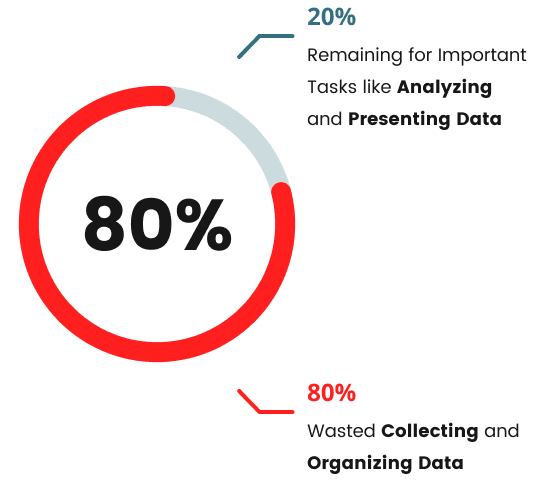
This doesn’t leave much time for important tasks like analyzing and presenting data. Which are the most important steps in producing results that your employer cares about.
Every second spent on manual data preparation is a minute lost on valuable analysis and decision-making.
The constant struggle with data can lead to burnout, low morale, and costly errors.
Your productivity and job satisfaction are at stake, and so are the potential savings for your company.
The longer you delay automating these tasks, the more you and your company lose.
And While You May Feel...
Reluctant to make dramatic changes to your workflow.
Skeptical that a single tool can transform you from an overworked analyst into a thriving professional.
Nervous about presenting changes to management and facing resistance.
You KNOW that you're desperate to avoid burnout.
And you’re tired of sacrificing your evenings and weekends playing catch-up at work.
So, what if you could eliminate the grunt work and focus on meaningful data analysis?
What if there was a way to automate repetitive tasks, and free up valuable time for impactful decision-making instead?

How Power Query Made Me Irreplaceable in My Job

I spent years learning to write macros just to automate my data cleanup tasks.
It was a painstaking process that required a lot of coding knowledge and time. But then, I discovered Power Query.
With Power Query, I was able to automate all my data preparation tasks WITHOUT writing a single line of code.
Just by pushing buttons, I could streamline complex data tasks in a fraction of the time.
I went from disposable to irreplaceable, and I want to help you do the same.
It's Time to Jumpstart Your Excel Skills.
Like me, you can automate your way through countless promotions, and learn how to manage your data more efficiently than ever before.
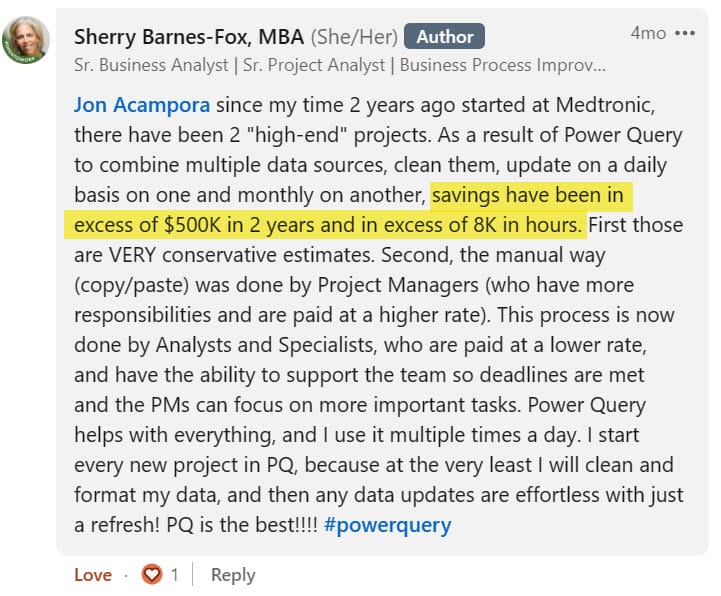
We Saved Over $500K
Take Sherry, a Business Analyst and Excel Campus student,
who has saved in excess of $500,000 for her company since learning Power Query
(and more than 8,000 hours of tedious, manual work).
By Mastering Power Query,
You Will...

Say goodbye to boring, repetitive, manual tasks.

Increase efficiency in the workplace and help you company's bottom line.

Lighten your workload and free up time for promotion-worthy work.

End the cycle of working overtime to get everything done.
Most importantly, you’ll be happier.
Not only will you become the go-to Excel expert in your company, thereby making yourself utterly essential. You’ll also improve your future job prospects and chances for promotion.
If you want to grow in your career, boost your morale, and have a more efficient workday, it’s time to change your workflow with Power Query.
You're Invited to Join Power Query Jumpstart.
The Power Query masterclass you need to become a better data analyst.
With Power Query You Can…

Extract and Import Data
No more boring, repetitive tasks: using Power Query you can extract data from a range of external sources without making changes to the source data.

Transform Data More Consistently
Using transformations, you can perform both complex tasks and simple, such as removing columns or filtering rows.

Cleanse and Prepare Data
With Power Query, you can combine (append) or join (merge) data sets, group & summarize (Pivot), and load data into storage with a few clicks.
Hear From Some of Our
Happy Students
If Our Other Students Can Achieve These Incredible Results
with Power Query, Then You Can Too.
So, What's Included?

Intro to Power Query
In this lesson, you'll discover how Power Query can streamline your workflow, freeing up 80% of your time (previously spent on repetitive tasks).
No more coding hassles – automate and cleanse your data effortlessly with Power Query. Our mission? To minimize boring work and maximize impact, empowering you to focus on producing results that can push your career forward.

Basic Transformations
In this lesson, we'll explore how to effectively manage data right from your worksheet, demystifying the Power Query window along the way.
Learn how to streamline your data by removing unnecessary columns, filling down, and effortlessly splitting text. Take your analysis further by performing calculations, and mastering the art of closing and loading your transformed data.

Combining Files
In this lesson, we cover how to seamlessly combine or stack data sets using the Append function in Power Query, a vital skill for any data professional.
Dive into the process of retrieving data from folders, cleaning it up with precision, and effortlessly outputting it to Excel for seamless analysis. But wait, there's more – discover how these techniques extend beyond Excel, as you explore integrations with various data sources and databases.

Automation and the Magical Donut
Ever wonder what happens when new data arrives? With our automated system, we'll show you how to simply drop a CSV file into the designated folder, and voila – it seamlessly integrates into your transformations and output.
You'll learn how to create a system that refreshes effortlessly, ensuring your data is always up-to-date and ready for analysis. And I'll explain why Power Query is the magical donut 🍩 of Excel.

Replacing VLOOKUP
In this lesson, we'll explore how Merge, a powerful feature of Power Query, replaces the need for VLOOKUP by simplifying data matching without the need for complex formulas.
Discover the basics of joining data sets and witness the magic of Merge in action. But that's not all – we'll also look into more advanced techniques, such as anti-joins, and show you how Power Query can elevate your data merging game to a whole new level.

What’s Next
Get ready to explore a world of possibilities beyond the basics as we delve into additional transformations like conditional columns, dates, and more.
We'll also dive deeper into our "Modern Excel Blueprint", unlocking new levels of efficiency and impact in your work.
But Wait,
There's More!
For just $27, you'll get lifetime access to our course content PLUS our awesome Excel Campus bonuses worth over $1,250.

$27 USD
Join Today and Get Lifetime Access
It's Step-by-step Power Query Training Made Easy

Bonus Training: Excel Dashboards Made Easy
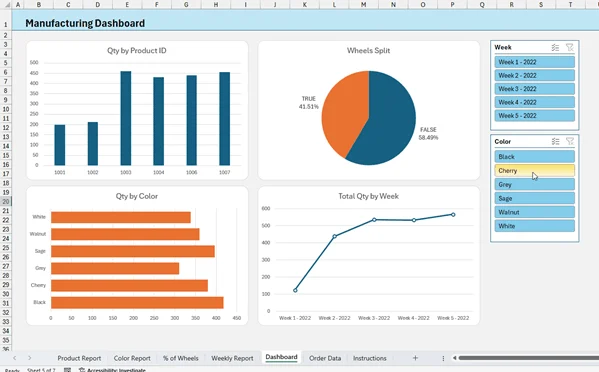
Once you start implementing Power Query, you will have more time to focus on the next steps in the data analysis process - analyzing and visualizing your data.
So, we've included a bonus training that's a crash course on creating interactive dashboards in Excel.
You are going to learn how to quickly analyze your data to discover new insights that will impress your boss and help make a bigger impact in your organization.
The bonus includes the video lesson and the before & after Excel files that you can use to follow along.
Get ready to create end-to-end, fully automated data solutions, that will help skyrocket your career.
Frequently Asked Questions
No.
We designed this course to be suitable for Excel users at the beginner to intermediate level. Excel formulas are a feature of Excel that will save you a ton of time, and we created this program to help make it accessible to more users, regardless of your current skill level.
Yes.
There is a comments section at the bottom of each lesson page where you can ask questions. Our team of Excel experts here at Excel Campus will help answer your questions.
You will also be able to see questions (and answers) from other members of the program.
Our goal is to help you learn quickly and efficiently, and we encourage you to ask questions.
If you are unsatisfied with your purchase for any reason, contact us within 30 days of purchase to get a full refund. We want you to be fully satisfied, learn a ton, and produce amazing results!
This course has been designed to get you up and running with Modern Formulas quickly.
You will use the companion Excel files to follow along and get hands on experience with real world examples.
We made this course short and succinct so that you can start implementing these formulas in your work immediately, to help produce results that matter to your organization.
There are about 5 hours of video lessons included in the course. Each lesson is about 5 to 7 minutes in length and covers a specific topic, formula, or scenario. This makes it easy for you to complete lessons as time permits.
You get lifetime access to the course. You can watch whenever you want, as often as you want. You can also access the course from any device including our mobile app.
Yes.
When you complete any of our courses you will earn a Certificate of Completion.
The certificate includes the number of training hours and skills mastered.
Each certificate is shareable, including its own certified web page that you can share with employers.
You can also easily add the certificate to your LinkedIn profile, share it on social media, add a badge to your email footer, include in your resume, print and frame it, and more.
We love celebrating our members' success and look forward to supporting you in your journey to learn and grow.
You will need Excel 2010 or newer for Windows or Microsoft365 for Mac.
Please note: Microsoft is no longer updating Power Query for older versions of Excel, however, we do our best to create content suited to all versions of Excel.
Meet Your Instructor


Jon Acampora
Microsoft MVP
Excel Campus Founder
15+ Years Teaching Experience
My mission is simple: to help you succeed with Excel. After experiencing the "overtime blues" in my own corporate finance career, I dedicated myself to mastering the tools that create automation and drive real business value.
As a Microsoft MVP for over 11 years, I've had the privilege of helping millions of viewers on YouTube and my blog (excelcampus.com) and guiding thousands of students in my training programs to become the Excel Heroes of their organizations.
Now, I want to share that same blueprint with you!
Trusted by Professionals at World-Class Companies:

You Have My Guarantee.
My goal is to help you learn Excel so you can use your time more productively (instead of wasting it on tedious data preparation).
These skills will allow you to easily maximize efficiency at your organization and help you gain exposure to top management. But if they don't?
You get your money back. No questions asked.
Join Us,
For This Limited Time Offer
For just $27, you'll get lifetime access to our course content PLUS our awesome Excel Campus bonuses worth over $1,250.

$27 USD
Join Today and Get Lifetime Access