

Build it once.
Make next month easier.
Use AI to turn repetitive Excel work into automations you can trust.
Repetitive Excel Work Used to Mean Late Nights
Most people open the same exports, clean up the same mess, rebuild the same report and send the same email every month.
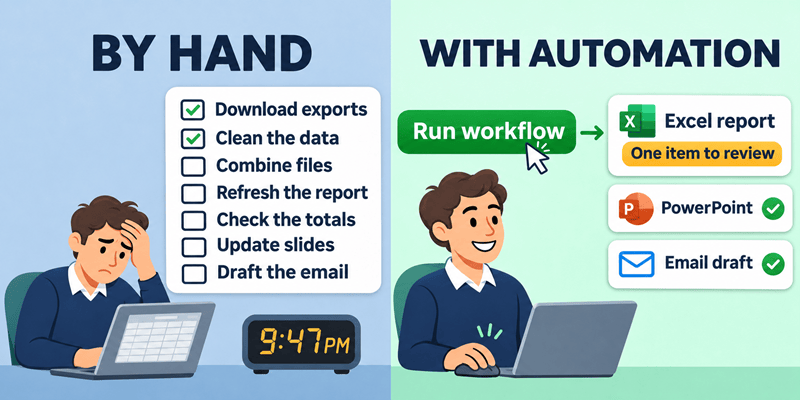
You know that AI and automation could end those late nights, but you might still be wondering:
Automation used to be reserved for developers and IT.
Now anyone can do it, if you know which steps
to give AI and how to check its work.
Introducing
AI Automations for Excel
The step-by-step system to turn the repetitive work in Excel into workflows you can trust, so you can save HOURS and become indispensable.
Who the Course is For
This is not another generic AI course. Every lesson is built around the real work Excel users repeat every week and every month: messy exports, monthly reports, expense reviews and the emails that follow.
The demand for these skills is growing fast:
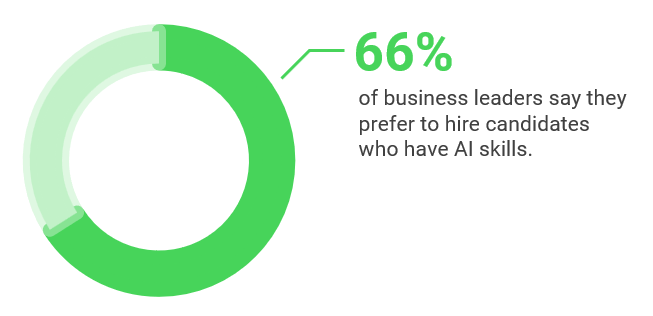
Studies show that 66% of business leaders are looking for candidates with AI skills.
And job postings on LinkedIn that mention "AI Literacy" have grown 600% in the last year.
This course is for you if:
All you need is access to one AI tool at work: Copilot, ChatGPT, Claude, etc.
What's Covered in the Course
7 sections • 38 lessons • 3+ hours of video
Learn how to determine whether a task needs AI's judgment or a formula's consistency. This is a critical step and framework that will be applied throughout the entire course.
- Clean Up Messy Order Data With AI
- Convert Export Timestamps With a Formula (Let AI Write It)
- How to Decide When to Use AI
- Match Customer Names That Don't Line Up
- Decide What to Automate
Save the steps once: skills hold the judgment steps, and queries hold the rule steps.
- Save Time and Improve Results with Skills
- Use and Maintain Skills in Copilot: One Source of Truth
- Create Skills in ChatGPT
- Create Skills in Claude
- Personnel Expenses Review Process
- Automate Exporting CSV Files from a System
- Consolidate CSV Files with Power Query
Build the report once so it refreshes every month, with AI adding the insights each run.
- Build Reports that Update and Refresh Automatically
- Get the Charts and Layout Right Without the Fiddling
- Build an Interactive Dashboard From Your Charts
- Check the Report Before It Goes Out
- Give AI the Business Context It Can't See in the Data
- Spot What Changed, and What You Didn't Think to Ask
- From New Data to New Insights in a Few Clicks
Check rule-based steps with totals and judgment steps with spot checks or a second AI, and fix the skill when AI gets it wrong.
- Why AI Gives Different Answers, and How to Know Which One to Trust
- How to Catch AI Hallucinations in Data Cleanup
- Audit AI-Built Formulas and Models One Step at a Time
- When AI Gets It Wrong, Fix the Skill So It Doesn't Happen Again
- Tie Out the Numbers With Control Totals
- Keep Your Workbook Safe: Review AI-Generated Code Before You Run It
Turn a pile of receipts into an expense process that runs weekly, starting with the steps that save the most time, with a person in the loop where judgment matters.
- Plan an Automation Project That People Actually Use
- Pick the First Step to Automate in Your Expense Process
- Get Data Out of PDFs, Scans and Receipt Photos
- Put It on a Schedule and Move Processed Files Automatically
- Reuse Your Skills to Categorize and Review Expenses Automatically
- Run the Same Automation in Copilot Cowork
Decide which follow-up tasks to automate, which to have AI draft for your approval, and which to keep doing yourself.
- Send the Report With an Email You Didn't Write
- Get the Review Booked and the Follow-Ups Out
- Turn the Report Into Slides in Two Minutes
- Integrate External Apps for Project Management
Draw your workflow, document it so others can run it, and prove the hours and dollars it saves.
- Draw Your Workflow So Anyone Can Follow It
- Manage and Share It So Others Can Run It
- Prove the Payoff and Track It Over Time
Real Examples from Inside the Course
This Isn't Theory. Here's Exactly What You'll Build.
You'll work through a realistic month-end for Copper Kettle Coffee Roasters, a business with wholesale, online and retail cafe sales. Every example uses the same messy data you'll see at work.
Turn Messy Exports into Clean Data in Minutes
Learn when to use Excel tools like formulas and Power Query, and when to use AI for free form text fields, sentiment analysis, fuzzy lookups, and unstructured data, without hours of manual cleanup.
Build a Report That Refreshes Itself
Consolidate monthly sales files from every location, build the report and dashboard once, then add a new month's data and refresh it in a few clicks. Then AI helps writes the insights.
Includes an intro to Power Query.
Finish the Job Outside of Excel
Draft the report email, book the review meeting, add the results to your slides and create tasks in your project management app. Decide what runs on its own and what waits for your approval.
Save Your Steps as Reusable Skills
Turn a multi-step task into a skill in ChatGPT, Claude or Copilot, so next month you run your saved instructions in one click instead of explaining everything again.
Turn a Pile of Receipts into an Expense Process That Runs Weekly
Extract data from receipt PDFs and photos, flag expenses that need a second look against your policy, and put the whole process on a schedule.
Share It and Prove What It Saves
Draw your workflow, create a hand-off document so others can run it, and track the hours and dollars you save to make the case to your boss. Build solutions that your coworkers will love, allowing you to take a stress-free vacation.
Apply This to Your Own Work
Most automations fail because they are too overwhelming or no one uses them.
This course solves that.
You'll use our Automation Blueprint workbook to determine exactly which step to start with (it's usually NOT step 1).
From there, the course walks you through getting it running, getting your team on board, and calculating the time and money it saves.
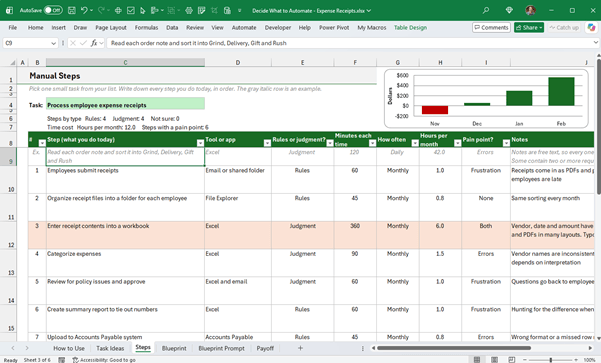
You'll build a real automation for your job,
with results you can bring to your next review or interview.
By the End of This Course
You'll Be Able To
Decide What to Automate
Use the rules-versus-judgment lens to pick the right tasks, and the right tool for each step.
Clean Data with AI
Turn messy exports into clean, structured data, and know when a formula or query is the safer choice.
Build Reports That Refresh
Create reports, charts and dashboards that update in a few clicks every month.
Check AI's Work
Catch mistakes before you send them, with control totals, spot checks and audits you can trust.
Automate on a Schedule
Run your process weekly, finish the job with emails, meetings and slides, and keep people in the loop.
Share It and Prove the Payoff
Document the workflow so others can run it, and show the hours and dollars you've saved.
Works With the AI Tool You Already Have
You only need one of them: Microsoft Copilot, ChatGPT, or Claude. The course covers each tool, but the focus is on the techniques, not the buttons. Most AI tools share the same core features, so what you learn works in whichever tool you use at work, and in the next one that comes along.

Copilot

ChatGPT

Claude
Note: If your company has its own internal AI tool, then you should still be able to use the training in this course.
In short: You'll become the go-to person who can turn any repetitive Excel process into a workflow you can trust, without waiting on IT.
Add AI Automations to Your LinkedIn Profile
When you finish the course, you'll earn a Certificate of Completion you can add to your LinkedIn profile and share with your manager.
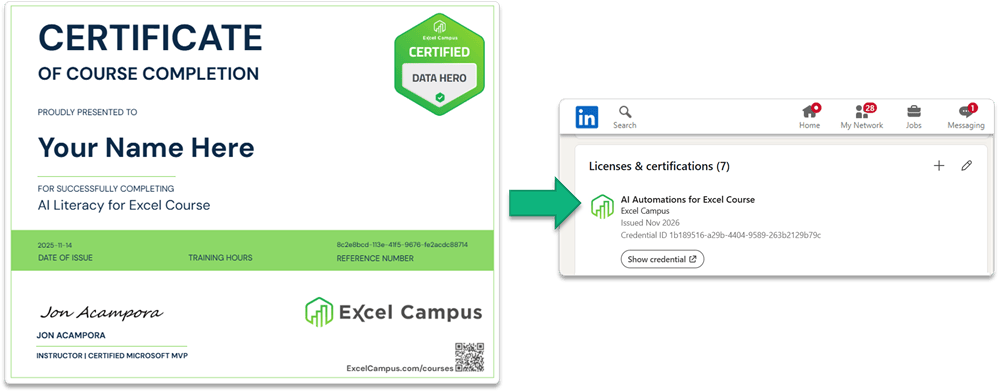
Show employers that you can do more than write a prompt. You know how to build automations, check the results and keep people in the loop.
That's a skill set that helps you stand out from the crowd.
What's Included
Everything You Need to Automate Excel with AI
Over 3 hours of on-demand video lessons that tracks you can access on any device
Prompt guides and reusable skills you can use on your own data
Direct support with comments section on every lesson page
Online learning platform that tracks your progress and includes a mobile app
Practice files to follow along with every example
The Decide What to Automate workbook, with a tracker for the hours and dollars you save
Certificate of Completion that syncs with your LinkedIn Profile
Lifetime access to rewatch the lessons anytime
30-day money-back guarantee
Regular Price: $297
Black Friday Price: Only $99
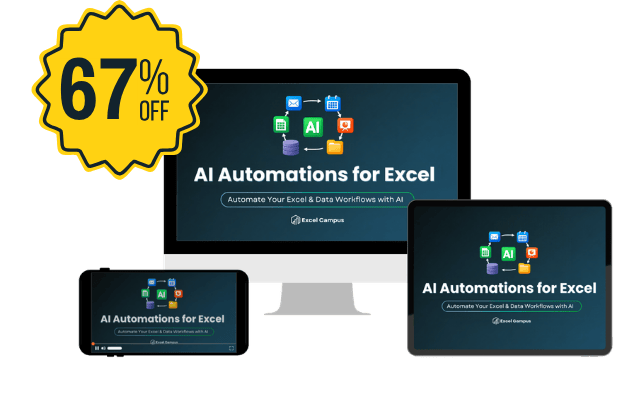
Save $198 (67% OFF) — Limited Time Only!
What Our Happy Students
Are Saying About Our AI Courses
Meet Your Instructor


Jon Acampora
Microsoft MVP
Excel Campus Founder
15+ Years Teaching Experience
I'm Jon Acampora, a Microsoft MVP and the founder of Excel Campus, and I've been teaching Excel for over 15 years.
I've spent my whole career automating my own work. I started Excel Campus in 2009, and I spent years building complex solutions by hand. Today, AI can cut that work from months or years down to minutes or days.
But AI only helps if you know where to trust it and how to check it. That's what I teach in this course: a practical system for automating the work you repeat, so you can spend your time on the work that matters.
Trusted by Professionals at World-Class Companies:
Frequently Asked Questions
No. You'll never need to write code yourself. When a lesson uses AI-built code, you'll learn how to review it before you run it.
You need access to one of ChatGPT, Claude or Microsoft Copilot at work. A lot of the course works with a free plan, though some features, like scheduled tasks, may need a paid plan. The course shows what each tool offers and what to do if yours is blocked.
No. AI Literacy is a great foundation, but this course is designed to stand on its own.
No. The examples work in Excel 2016 or later, on both Windows and Mac. Some Copilot examples require Microsoft 365 and a Copilot license.
AI Automations focuses on whole workflows: cleaning data, building reports, checking the results and running the process on a schedule, with no coding required. AI Coding teaches you to write VBA macros, Office Scripts and Python with AI.
The course includes a lesson on what not to paste into AI, and the examples use practice data so you can learn without risk.
The course has over 3 hours of video. Each lesson is about 3 - 7 minutes in length.
We kept the lessons short so you can progress quickly and also have more time to practice. But don't let the short length fool you, the lessons are packed with valuable training that will help you implement AI in your work immediately.
Most people finish in a few weeks, and you can go at your own pace.
Yes. You pay once and keep access for life, on any device, including our mobile app.
Each lesson page has a comments section moderated by the Excel Campus team, so you can get your questions answered.

You Have My Guarantee.
Try the course for 30 days. If you don't feel it's helping you automate your work with AI, just let us know.
You get your money back. No questions asked.
Join AI Automations for Excel
During This Black Friday Offer
For just $297 $99, you'll get lifetime access to the complete course, practice files, reusable skills and the Decide What to Automate workbook. Black Friday pricing ends Cyber Monday, November 30.

$297 $99 USD
Save 67% and Get Lifetime Access
Your Repetitive Excel Work Doesn't Have to Stay Repetitive
Don't get left behind, get ahead of it.
Enroll Now for $99 (Regularly $297, Save 67%). Offer ends Cyber Monday, November 30.
© 2026 EXCEL CAMPUS. ALL RIGHTS RESERVED. | Privacy Policy | Contact Us